Lev Goncharov
Infrastructure simplifying engineer
Terraform Meets Proxmox: Lessons from a VMware Migration
Date: 2026-10-06
1. TLDR
Moving from VMware to Proxmox looks like a hypervisor migration without touching IaC parts above. It is a false assumption. There are a lot of pitfalls on this way:
- how templates are built
- how virtual machines are initialized
- how storage is selected
- what happens when deployment fails halfway through

In our VMware environment, Terraform managed hundreds of VMs. We had quite mature IaC stack and processes(aka IDLC):
- Packer and Ansible built the templates
- Terraform provisioned the machines
- Ansible configured the workloads
- Tests cover almost the entire IaC workflow
That workflow had taken time to develop(Ansible: CoreOS to CentOS, 18 months long journey), and we wanted to carry its useful parts forward as we started working with Proxmox. The familiar tools did not make the new platform behave like the old one.
2. Hypervisors comparison
Due to cost efficiency we started to think about alternatives. We had physical servers, storage systems, etc and wanted to re-use it. Not many options were available in our case
| Platform | Proxmox VE (KVM/QEMU) | XCP-ng + Xen Orchestra | Microsoft Hyper-V | Vanilla KVM (libvirt only) | VMware |
|---|---|---|---|---|---|
| Cost Licensing | free | free | ??? | free | ??? |
| Cost Support | ~1k–2k€/year | ~1k–2k€/year | ??? | N/A | ??? |
| Live Migration | yes | yes | yes | yes | yes |
| Windows VM Support | Good with virtio | Good (Xen PVHVM) | Best Windows support (native drivers) | Good with virtio | yes |
| FC SAN Support | Yes (FC via multipath) | Yes (FC via multipath) | Possible but FC is more complex | Yes (FC via multipath) | yes |
| Packer Templates | yes | yes | yes | yes | yes |
| Terraform Integration | yes | yes | yes | yes | yes |
| Ease of Management | good | good | medium, SCVMM is required | low | good |
| Community | huge | Medium | Medium | small | huge |
| Customizability | Medium | Medium | Medium | High | Medium |
| Migration Complexity | Medium: manual VM rebuild or scripted conversion | Medium: manual VM rebuild or scripted conversion | High: image formats differ | High: DIY everything | N/A |
2.1. Proxmox VE
Looks like the most realistic choice for small/mid-size clusters. out of the box:
- Web UI, Terraform, Packer
- Reliable live migration
- FC, multipath
- Low operational overhead
2.2. XCP-ng + Xen Orchestra
Very strong alternative. Slightly more enterprise-oriented than Proxmox. Extremely stable, widely used in hosting providers:
- XO (Xen Orchestra) provides an excellent management UI. also Packer/Terraform
- Live migration, FC
- Smaller ecosystem than Proxmox.
2.3. Microsoft Hyper-V
- Best Windows guest support
- Stable live migration
- Works OK with FC
- Licensing might destroy budget
- Management is worse than Proxmox/XCP-ng unless using SCVMM (might cost something)
2.4. Vanilla KVM (libvirt)
Only makes sense if you want to build your own cloud. You don’t.
- Free
- Very flexible
- No cluster UI
- No centralized management
- Operational overhead becomes huge
3. Storage
Choosing a hypervisor was only part of the story. The next question was: where do we put the VM disks so that VMs can move between hosts? Or maybe we use local disks?
3.1. Storage comparison
The requirements were quite simple:
- The same VM disks must be accessible from all relevant cluster nodes.
- Moving a VM should not require copying its disks to another host.
- If a host fails, another host must be able to access the disks and restart the VM through HA.
- The solution must work with our Packer, Terraform, and Ansible workflow.
- We must be able to operate and troubleshoot it.
We already had a storage array, a storage fabric, and physical servers. The array could provide iSCSI and NFS. We wanted to reuse this hardware, not build a new storage platform from scratch.
| Option | Local FS | NFS | Shared LVM over FC | Clustered filesystem | Ceph RBD |
|---|---|---|---|---|---|
| Proxmox integration | Native | Native | Native | clustering configured separately | Native |
| How VM disks are stored | Files on each host | Files on a shared export | Logical volumes on shared LUNs | Files on GFS2 or OCFS2 | Distributed block images |
| Support VM disks | Yes | Yes | Yes | Yes | Yes |
| Support ISO images | Yes | Yes | No | Yes | No |
| Support snippets | Yes | Yes | No | Yes | No |
| VM disk formats | raw, qcow2, vmdk | raw, qcow2, vmdk | raw | raw, qcow2, vmdk | raw |
| Snapshots | With qcow2 | With qcow2 | No | With qcow2 | Yes |
| Linked clones | With qcow2 | With qcow2 | No | With qcow2 | Yes |
| Live migration | No | Yes | Yes | Yes | Yes |
| Reuses existing storage array | No | Yes | Yes | No | No |
| Good | Simple setup | Simple setup | flexible | ||
| Bad | host-loss recovery needs another copy | Depends on the network | hard to maintain | very hard to maintain and fragile | extremely hard to maintain |
- Local FS - there is no cluster
- NFS - simple, but lack of performance
- Shared LVM over FC - quite good, but a little bit fragile.
- Clustered filesystem - too fragile because of kludges
- Ceph RBD - In our team the only I had tons of experience with ceph(~10pb & migrations 0.87 -> 12) and it didn’t allow to re-use the existing storage.
In our shortlist we had NFS & FC. NFS looked simpler, but performance so bad that I’m too shy to share the numbers. However, we decided to use combination of NFS & FC(a bit later what for).
3.2. Storage performance

There is no silver bullet in choosing storage by protocol name. The idea was quite simple
- get old unused storage with sas disks
- mount the storage to each hypervisor
- create 10 VMs at each hypervisor
- run fio at the VMs
- collect data & aggregate
The test sequence with params for fio 64G file during 3600 seconds for each profile. It’s not the best performance measuring approach but allows to get some ideas and extrapolate the results.
- warm up: just write to flush all caches.
randread-4k: random reads with 4 KiB blocks.randwrite-4k: random writes with 4 KiB blocks.read-1m: sequential reads with 1 MiB blocks.write-1m: sequential writes with 1 MiB blocks.
VMware
| Metric | Description | randread-4k | randwrite-4k | read-1m | write-1m |
|---|---|---|---|---|---|
| aggregate_iops | Total IOPS from all VMs | 9950 | 1862 | 378 | 227 |
| average_vm_iops | Average IOPS per VM | 995 | 186 | 38 | 23 |
| min_vm_iops | Lowest IOPS from one VM | 740 | 140 | 22 | 17 |
| max_vm_iops | Highest IOPS from one VM | 2164 | 376 | 44 | 28 |
| aggregate_mib_per_second | Total speed from all VMs in MiB/s | 39 | 7 | 378 | 227 |
| average_vm_mib_per_second | Average speed per VM in MiB/s | 4 | 1 | 38 | 23 |
| weighted_mean_latency_ms | Average latency weighted by I/O count, in milliseconds | 64 | 344 | 423 | 703 |
| average_vm_p50_latency_ms | Average p50 latency across VMs, in milliseconds | 61 | 314 | 384 | 595 |
| average_vm_p70_latency_ms | Average p70 latency across VMs, in milliseconds | 78 | 481 | 543 | 925 |
| average_vm_p80_latency_ms | Average p80 latency across VMs, in milliseconds | 93 | 546 | 655 | 1119 |
| average_vm_p90_latency_ms | Average p90 latency across VMs, in milliseconds | 121 | 620 | 829 | 1434 |
| average_vm_p95_latency_ms | Average p95 latency across VMs, in milliseconds | 151 | 703 | 1000 | 1855 |
| average_vm_p99_latency_ms | Average p99 latency across VMs, in milliseconds | 226 | 2227 | 1424 | 2849 |
Proxmox
| Metric | Description | randread-4k | randwrite-4k | read-1m | write-1m |
|---|---|---|---|---|---|
| aggregate_iops | Total IOPS from all VMs | 2287 | 7028 | 73 | 116 |
| average_vm_iops | Average IOPS per VM | 229 | 703 | 7 | 12 |
| min_vm_iops | Lowest IOPS from one VM | 142 | 372 | 5 | 8 |
| max_vm_iops | Highest IOPS from one VM | 292 | 1037 | 11 | 17 |
| aggregate_mib_per_second | Total speed from all VMs in MiB/s | 9 | 27 | 73 | 117 |
| average_vm_mib_per_second | Average speed per VM in MiB/s | 1 | 3 | 7 | 12 |
| weighted_mean_latency_ms | Average latency weighted by I/O count, in milliseconds | 280 | 91 | 2203 | 1373 |
| average_vm_p50_latency_ms | Average p50 latency across VMs, in milliseconds | 219 | 87 | 2250 | 1362 |
| average_vm_p70_latency_ms | Average p70 latency across VMs, in milliseconds | 421 | 115 | 2679 | 1689 |
| average_vm_p80_latency_ms | Average p80 latency across VMs, in milliseconds | 484 | 139 | 2965 | 1934 |
| average_vm_p90_latency_ms | Average p90 latency across VMs, in milliseconds | 603 | 183 | 3466 | 2337 |
| average_vm_p95_latency_ms | Average p95 latency across VMs, in milliseconds | 730 | 237 | 3956 | 2750 |
| average_vm_p99_latency_ms | Average p99 latency across VMs, in milliseconds | 979 | 479 | 5273 | 4033 |
the outcome is not that straight forward. There is no clear overall winner.
- VMware is better for write 4k workloads from latency point of view(I would say the most realistic scenario IRL).
- Proxmox is better for large operations sequential operations eg dd inside
4. What We Already Had and Planned
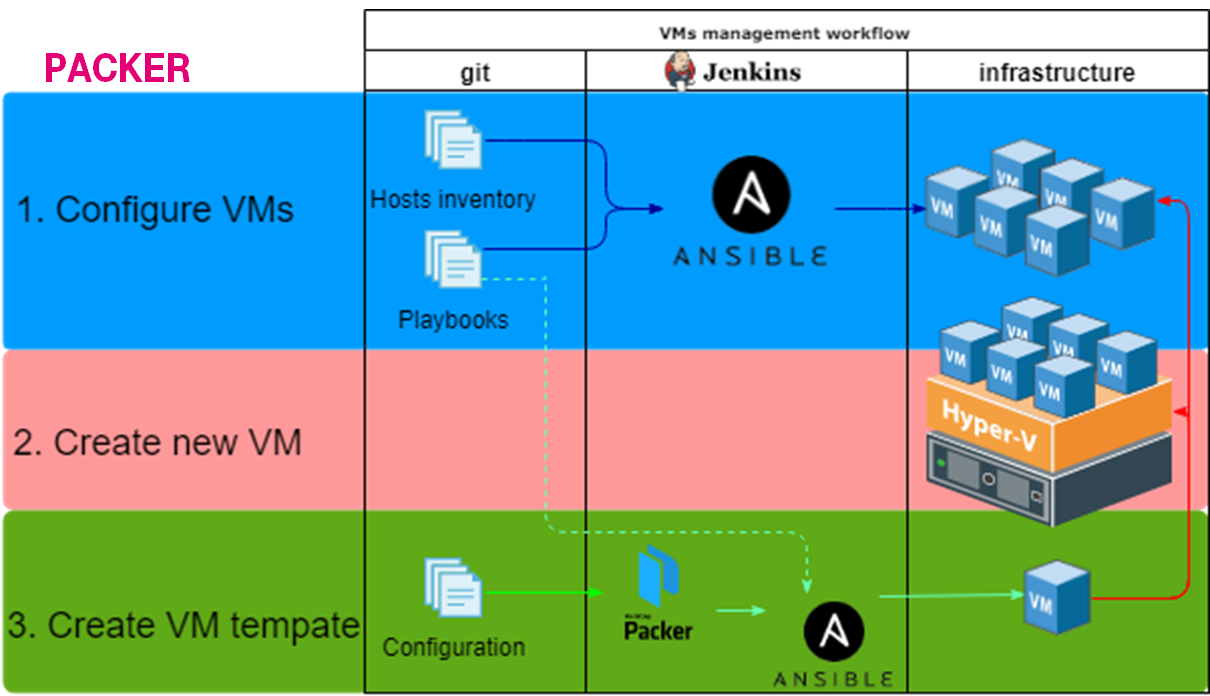
Almost everything was stored in git. There were some linked processes:
- Packer: Create a VM template via Packer, apply base configuration via Ansible, and save it to the VMware content library.
- Terraform: Create a new VM from the VM template in the content library and assign tags.
- Ansible: Split VMs into groups according to the VMware tags and customize the VMs.
The idea was to implement that flow with Proxmox as a foundation.
5. MVP creation
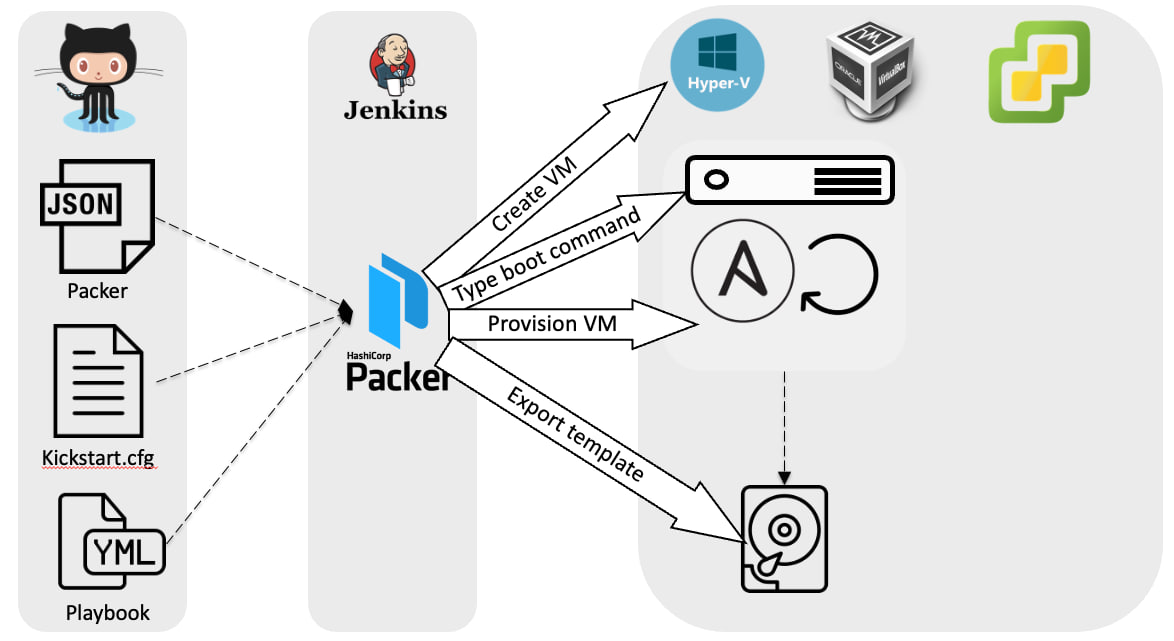
To run some load it was required to build golden image. It was quite simple.
- Uploaded ISO to the storage.
- Reused the existing Packer configuration and just changed the backend.
- Ran Jenkins to build the image successfully.
5.1. Problems: can’t find boot disk
Steps to reproduce:
- You create VM via Terraform from a template
- VM states:
couldn't read boot disk
Result: created VM is not bootable How to avoid: specify efi, disk/vm size/type Example:
resource "proxmox_vm_qemu" "virtual_machine" {
  name         = "testvm"
  full_clone   = true
  bios         = "ovmf"
  machine      = "q35"
  scsihw       = "virtio-scsi-single"

  efidisk {
    storage           = "lv-vm01"
    format            = "raw"
    efitype           = "4m"
    pre_enrolled_keys = false
  }
5.2. Problems: can’t reach the VM by ssh
Steps to reproduce:
- You create VM via Terraform from a template
Result: created VM is not reachable by ssh How to avoid: specify VLAN Example:
  network {
    id     = 0
    model  = "virtio"
    bridge = "vmbr0"
    tag    = 111
  }
5.3. Problems: guest VM doesn’t set hostname
We use DNS + DHCP integration. VMs send hostnames as a part of DHCP request and it makes them reachable.
Steps to reproduce:
- You create VM via Terraform
- Hostname from the template is used
- Network or VM restart is required
Result: created VM is not reachable How to avoid: use cloud-init for VM reboot Example:
#cloud-config
power_state:
  delay: "+1"
  mode: reboot
  message: "Rebooting after initial cloud-init configuration"
  timeout: 30
  condition: [mkdir, /var/lib/cloud-init-reboot-after-first-boot]
5.4. Problems: standard cloud-init is overwritten
We use DNS + DHCP integration. VMs send hostnames as a part of DHCP request and it makes them reachable.
Steps to reproduce:
- You create VM via Terraform
- You customize VM cloud-init and set
cicustom
Result: whole cloud-init config is overwritten and hostname is not set by Proxmox.
How to avoid: use correct cicustom
Example:
resource "proxmox_vm_qemu" "xxx" {
  name     = "xxx"
  cicustom = "vendor=storage:snippets/reboot-after-first-boot.yaml"

...
5.5. Know-how: Race conditions during terraform apply
Steps to reproduce:
- Person A changes something & runs
terraform apply - Person B changes something & runs
terraform apply
Result: infrastructure is not in consistent state How to avoid: use remote state
6. Moving the First Workload
Approximately at this point we were able to follow to create & manage VMs like we did. We started polishing details. We were moving from MVP to production.
6.1. Problems: Terraform can’t manage cloud-init snippets
Steps to reproduce:
- You create VM via Terraform
- cloud-init is used to customize
- cloud-init snippet must be pre-created at each host
Result: created VM is not reachable How to avoid: create shared storage with snippet support. In our case we already had NFS storage so some minor changes in Proxmox were missing. Example:
#  cat /etc/pve/storage.cfg
nfs: vm-images
        export /pve
        path /mnt/pve/vm-images
        server 192.168.xxx.yyy
        content rootdir,snippets,images
        prune-backups keep-all=1
6.2. Problems: VM is not reachable if host is down
Steps to reproduce:
- You create VM at the specific host
- The host goes down
Result: created VM is not reachable How to avoid: use HA cluster feature Example:
resource "proxmox_vm_qemu" "virtual_machine" {
  name         = "testvm"
  target_nodes = ["xxx", "yyy", "zzz"]
  hastate      = "started"
6.3. Problems: Terraform exited, but VMs are not created
Steps to reproduce:
- You create VM and it crashed due to timeout
│ Error: error performing http request: Get "https://xxx:8006/api2/json/cluster/resources?type=vm": context deadline exceeded
│
│ with proxmox_vm_qemu.virtual_machine["test-xxx-perf-lv-vm01-01"],
│ on main.tf line 30, in resource "proxmox_vm_qemu" "virtual_machine":
│ 30: resource "proxmox_vm_qemu" "virtual_machine" {
Result: There are lvm leftovers and stale tf state
How to avoid: Set pm_timeout
Example:
provider "proxmox" {
  pm_api_url      = var.proxmox_api_url
  pm_user         = var.proxmox_user
  pm_password     = var.proxmox_password
  pm_timeout = 7200
}
6.4. Problems: lvm leftovers
Steps to reproduce:
- You create VM and it crashes somehow(eg timeout)
- You run Terraform and get an error
│ Error: task error: task id: UPID:xxx:zzz:zzz:zzz:qmclone:102:somelogin@pam: message: clone failed: lvcreate 'pve-vm01/vm-103-disk-0' error:   Failed to activate new LV pve-vm01/vm-103-disk-0.
│
│   with proxmox_vm_qemu.virtual_machine["test-xxx-perf-lv-vm01-02"],
│   on main.tf line 30, in resource "proxmox_vm_qemu" "virtual_machine":
│   30: resource "proxmox_vm_qemu" "virtual_machine" {
Result: Terraform exits with a non-zero exit code How to avoid: remove leftovers
dmsetup ls | grep 'vm--'
dmsetup remove pve--vm01-vm--102--cloudinit
dmsetup remove pve--vm01-vm--102--disk--1
udevadm settle
6.5. Problems: cluster race condition
Steps to reproduce:
- You create multiple VMs and it crashed somehow
│ Error: api error: code: 500 message: Configuration file 'nodes/xxx/qemu-server/102.conf' does not exist
│
│   with proxmox_vm_qemu.virtual_machine["test-xxx-perf-lv-vm01-01"],
│   on main.tf line 32, in resource "proxmox_vm_qemu" "virtual_machine":
│   32: resource "proxmox_vm_qemu" "virtual_machine" {
Result: Terraform exits with a non-zero exit code. The problem behind is that during terraform apply Proxmox might move VMs to another host
How to avoid: 2-step vm creation
terraform apply -var='vm_ha_enabled=false'
terraform apply -var='vm_ha_enabled=true'
6.6. Problems: slow VMs creation
Steps to reproduce:
- You create a Packer template with huge disk
- You create multiple VMs and it takes 10 minutes for each instead of 3 minutes
Result: wasting of time How to avoid: Create VM template with a small disk & resize it via cloud-init
growpart:
  mode: auto
  devices:
    - /dev/sda3

runcmd:
  - [pvresize, /dev/sda3]
  - [lvextend, -r, -l, "+100%FREE", /dev/sysvg/root]
7. Migration: Recreating Stateless Workloads
We have a fleet of VMs and the vast majority of them is stateless and configuration is well defined via IaC. It means that migration algorithm is quite simple:
- Stop old VMs
- Create new VMs
- Check new VMs
- If something is terribly wrong then roll back & troubleshoot
- Delete old VMs
- Repeat with another batch
To make our life a bit easier we hide complexity inside module. This module creates unified VMs
locals {
  somevms = {
    worker01 = { num_cpus = 2, memory = 16384, diskSize = "60G", annotation = "xxx" },
    worker02 = { num_cpus = 4, memory = 16384, diskSize = "60G", annotation = "xxx" },
    worker03 = { num_cpus = 8, diskSize = "160G", annotation = "xxx" },
  }
  vlanID = xxx
}

resource "proxmox_pool" "ci" {
  poolid = "ci"
}

module "awesomevms" {
  source = "./modules/proxmox_vm"

  for_each = local.somevms

  name          = each.key
  annotation    = try(each.value.annotation, "some important note")
  num_cpus      = try(each.value.num_cpus, null)
  memory        = try(each.value.memory, null)
  vm_ha_enabled = try(each.value.vm_ha_enabled, true)
  diskSize      = try(each.value.diskSize, "27G")
  vlanID        = local.vlanID
  pool          = proxmox_pool.ci.poolid
  tags          = "xxx;yyy"
}
The interesting thing is that we have a module for VMware and it has almost the same set of params. So, we can simply copy-paste the config(yeah it’s time to mention S.O.L.I.D for IaC).
8. Where We Are Now

In current implementations not all parts are finished
- Terraform is executed manually
- sometimes LVM leftovers appear
- cloud-init customization is deployed manually
- Ansible dynamic inventory is not introduced

Final notes:
- Our target flow is to fully automate the processes and have kind of gitops friendly immutable infrastructure.
- What would I do differently? I think the weakest point is the storage. Maybe it’s possible to simplify solution and use just local storage for stateless VMs.
- I expect to learn a lot from cluster LVM troubleshooting